
Referral Program
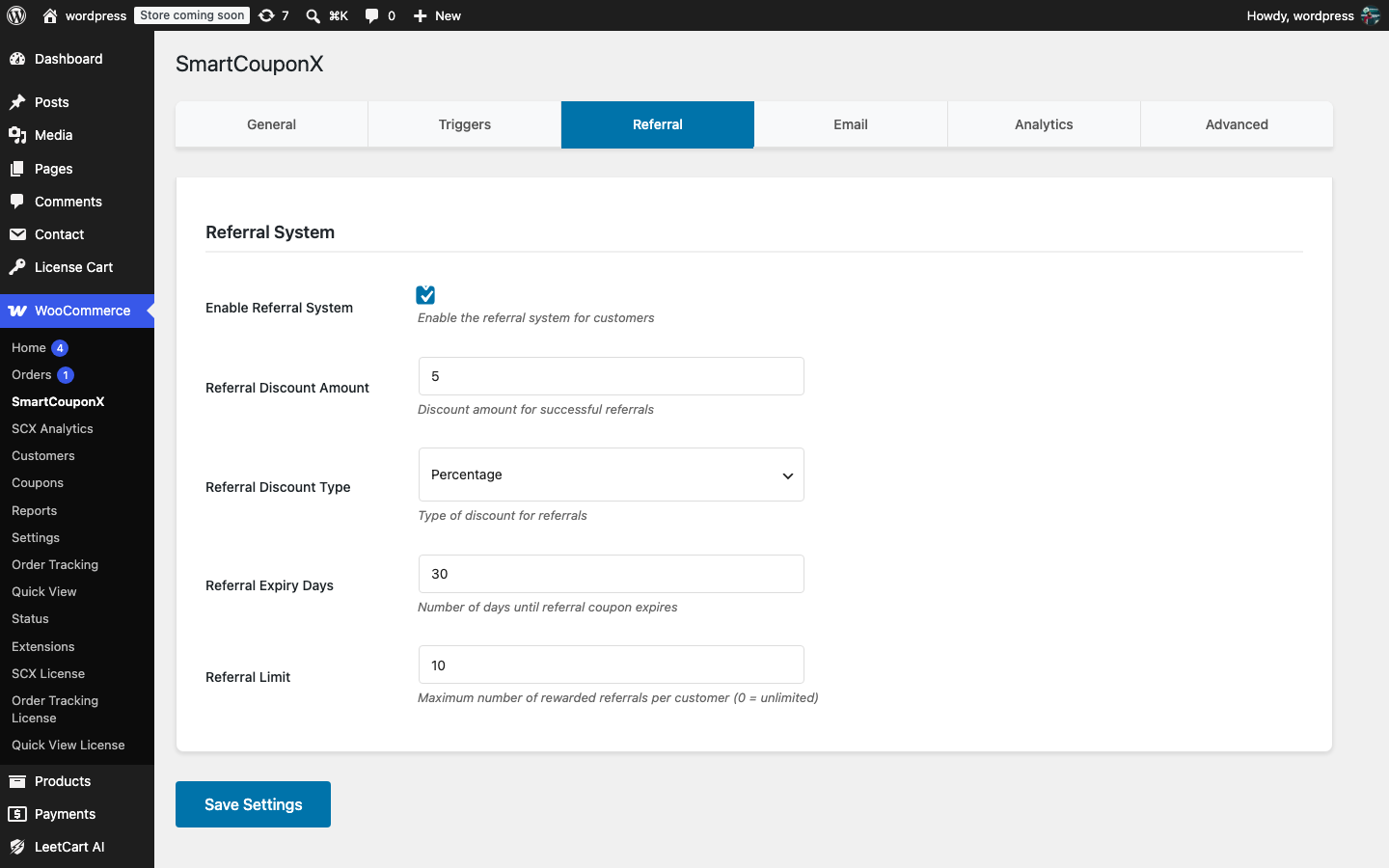
Setting it up#
- Go to WooCommerce > SmartCouponX > Referral and tick Enable Referral System (on by default).
- Set the Referral Discount Amount, Referral Discount Type and Referral Expiry Days for the coupon the referrer receives.
- Set Referral Limit to the maximum number of rewarded referrals per customer, or
0for unlimited. - Click Save Settings.
- Tell your customers: add a line to your order confirmation or a My Account notice pointing them to My Account > Referrals.
What the customer sees#
Under My Account > Referrals each customer finds:
- Your Referral Link:
https://your-store.com/?ref=REFXXXXXXXX, generated the first time they open the page. The code is permanent for that customer. - Your referral code: the
REF…part of the link. - Your Referral Statistics: total referrals and rewarded referrals.
- Recent Referrals: the last ten referred customers shown as first name and last initial, with a status (Rewarded, Pending, Cancelled, Blocked by limits or Not rewarded) and date.
Customers share the link anywhere: email, social media or messaging apps. Any page URL on your site works as long as it carries the ?ref= parameter, for example https://your-store.com/product/blue-shirt/?ref=REFXXXXXXXX.
How a referral is rewarded#
- A visitor opens a link with a valid
?ref=code. The plugin stores the code in thesmartcouponx_referralcookie for 30 days and logs a referral click in analytics. Opening your own link does nothing. - The visitor places an order while the cookie is present. At checkout (classic or block) the code is saved on the order.
- When that order becomes Processing or Completed, the plugin checks that:
- the buyer has an account and is not the referrer;
- the buyer has no earlier order that is pending, on hold, processing or completed (so only genuinely new customers count);
- this referrer has not already been rewarded for this buyer;
- the referrer is under the Referral Limit;
- the referrer passes the abuse prevention checks.
- If everything passes, a
REF_coupon is created for the referrer, locked to their email, and the email “You earned a referral reward!” is sent. The referral is recorded as Rewarded. - If the referred order is later cancelled or refunded, the referral is marked Cancelled and the referrer’s coupon is trashed if it has not been used.
The person who was referred does not receive a coupon from the referral itself; if you want to welcome them too, enable Registration Coupons or Post-Purchase Coupons.
Referrals are only rewarded for registered buyers. If your checkout allows guest orders, consider enabling Allow customers to create an account during checkout in WooCommerce > Settings > Accounts & Privacy so referred shoppers can be matched.
Was this article helpful?
Tell us what was missing