
History and Exports
History#
The History and exports tab keeps the last 10 scans. Older scans and their findings are deleted automatically. Each row shows the scan date (a link to view that scan’s results), its status (Complete, Running, Cancelled or Stopped), how long it took, the WordPress version, the number of plugins and themes in each verdict, the total number of findings, and export links.
Comparing two rows is a quick way to see whether updating a plugin fixed its findings.
Print report#
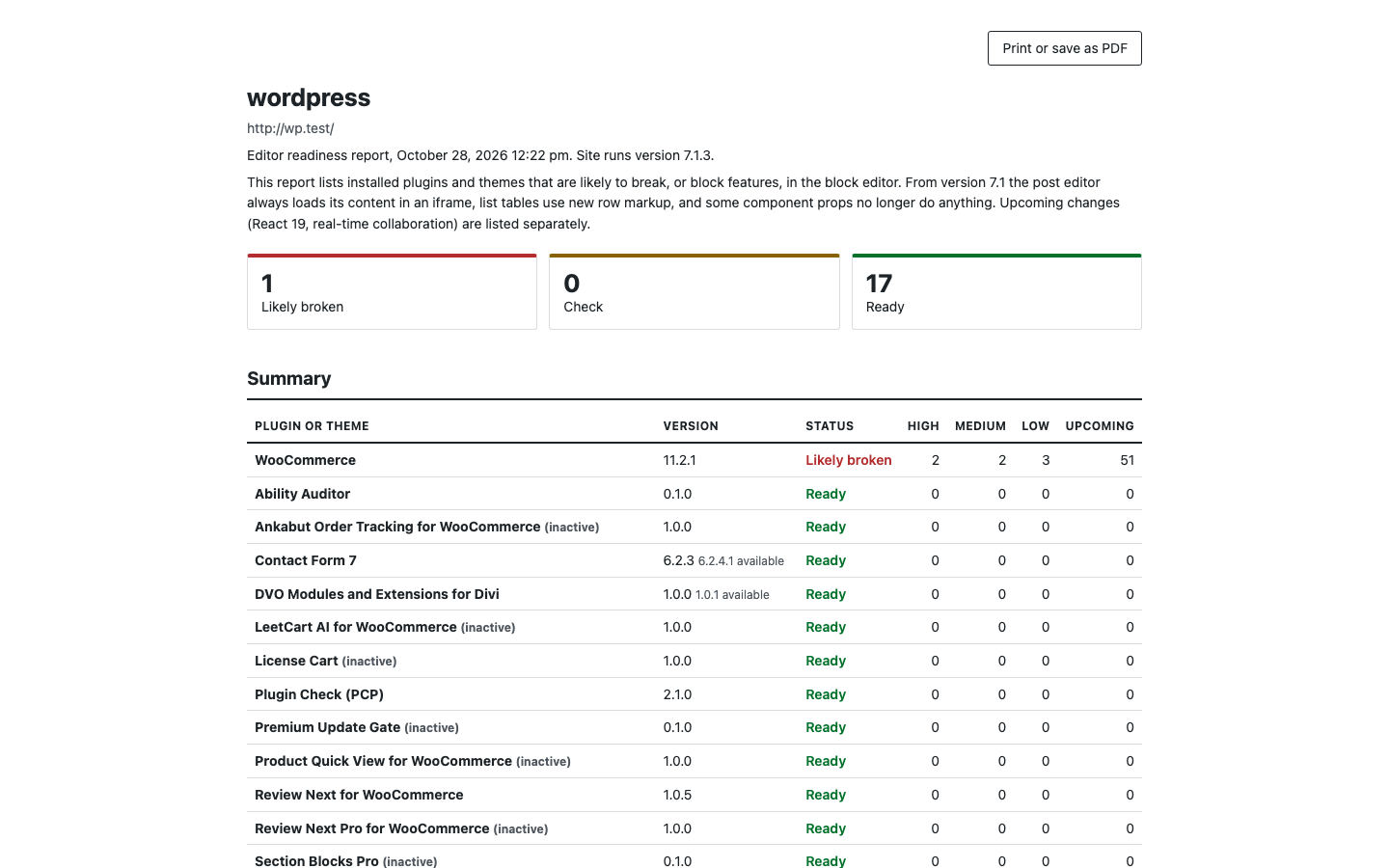
Print report (on the summary page, or Report in the history) opens a print-friendly HTML page in a new tab with a Print or save as PDF button. It contains:
- the site name and scan date;
- a short explanation of what the report covers and a How this was checked section, so a client understands what the findings are;
- a summary table of every plugin and theme with its verdict and severity counts;
- the findings for each plugin or theme with Why it matters, Fix and the official dev note link;
- a Meta boxes and real-time collaboration table per post type.
CSV export#
Export CSV downloads editor-readiness-{site-name}-{date}.csv with one row per finding and these columns:
site, scan_date, component, component_type, component_version, component_status, rule_id, rule_title, rule_status, severity, confidence, file, line, snippet, details, dev_note_url
Cells that begin with =, +, - or @ are prefixed with an apostrophe so that spreadsheets do not run them as formulas.
JSON export#
Export JSON downloads editor-readiness-{site-name}-{date}.json, the full report:
{
  "generator": { "name": "Editor Readiness Scanner", "version": "1.0.0" },
  "site": { "name": "Example", "url": "https://example.com/" },
  "scan": { "id": 3, "status": "complete", "started_at": "…", "finished_at": "…", "wp_version": "7.1", "stats": { } },
  "include_upcoming": false,
  "totals": { "broken": 1, "check": 2, "ready": 14 },
  "components": [
    {
      "key": "plugin:example", "name": "Example", "type": "plugin", "version": "2.3.0", "active": true,
      "status": "broken", "counts": { "high": 1, "medium": 0, "low": 0, "info": 0 }, "upcoming": 0,
      "findings": [ { "rule_id": "…", "title": "…", "severity": "high", "confidence": "high", "file": "…", "line": 12, "snippet": "…", "details": "…", "why": "…", "fix": "…", "dev_note_url": "…", "evidence": { } } ]
    }
  ],
  "meta_boxes": { }
}
The generator key is left out when white label is on. Exports made from a summary view with Count upcoming changes ticked carry that setting (include_upcoming: true) and their verdicts reflect it.
White label#
Under Report settings on the History tab, tick White label: leave this plugin’s name out of printed reports and exports and click Save settings. Reports then carry only the site name and scan date, so you can send them to clients as your own. See Settings.